
Keeta - Food Delivery
KANGAROO LIMITEDFood & Drink
3.5349.00 Reviews
- Version
- 3.11.402
- Installs
- 10.00M
- Age Rating
- Everyone
Screenshots

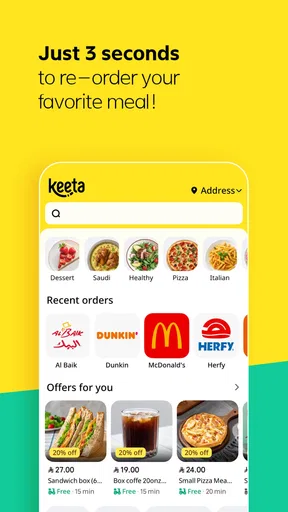
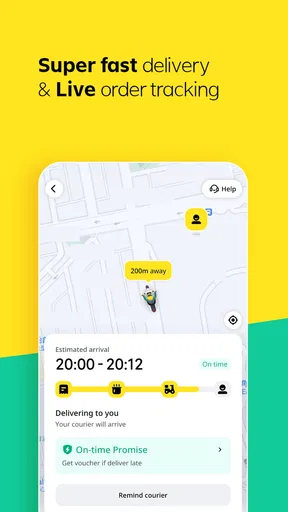
Our Review of Keeta - Food Delivery
 Analysis by Appyee
I found Keeta most useful when I wanted food delivery to feel quick and uncomplicated rather than when I wanted a large planning tool for every possible meal. Its central appeal is easy to understand: open the app, browse nearby food, choose what looks right, and place an order without turning a simple dinner into a project. After spending time with it, my view is that it works best as a practical everyday option for people who already know what kind of food they want and value a direct ordering experience.
That simplicity is also the key to judging it fairly. Keeta is a free Food & Drink app from KANGAROO LIMITED, available to everyone, and it has become a familiar name on Android, with over ten million installs and an average rating of three and a half. Those figures suggest a broad audience, but they also tell me not to treat it as a flawless service. The app can be convenient and pleasant, yet delivery experiences depend heavily on the local restaurants and couriers available in a user's area.
What using Keeta feels like in daily life
The first thing I noticed is that Keeta is easiest to appreciate when I approach it with a clear purpose. If I am hungry after work and already leaning toward noodles, burgers, rice dishes, or another familiar choice, browsing is straightforward. I can focus on the available restaurants instead of beginning with a long search across the wider internet. That makes the app feel more useful for a decision I want to finish quickly than for someone who enjoys comparing every possible option.
A realistic example is a busy evening when I have little energy left to cook. I open the app, check what is available nearby, look through the menus, and compare the final order before committing. In that situation, the value is not just finding food. It is reducing the number of small decisions between “I need dinner” and “dinner is on its way.” I would still read the menu carefully, check the order details, and make sure the selected items match what I intended, but the overall workflow feels natural.
Keeta also makes sense for people who order for more than one person. Group orders often become confusing because everyone wants something different, and a small mistake can affect the whole meal. I recommend reviewing the basket slowly before placing the order rather than adding items in a rush. This simple habit is especially useful when dishes have similar names or when customizations are easy to overlook.
The app's store summary, “Eat better, live better,” is broad, but my experience is less about lifestyle advice and more about practical access to prepared food. I would not install it expecting nutrition coaching, meal planning, or a recipe library. It belongs in the same everyday space as other delivery services: a tool for choosing and receiving meals, not a replacement for cooking knowledge or a personal diet manager.
Where the ordering experience earns its place
The strongest part of Keeta is the short path from browsing to action. Food delivery apps can become cluttered with promotions, categories, recommendations, and extra choices. Keeta feels more appealing when I use it with a specific meal in mind because the essential task remains visible. I can examine restaurant options, inspect dishes, and prepare an order without needing to learn a complicated system first.
That does not mean I would blindly choose the first result. My better workflow is to compare a few nearby options, read the item descriptions, and look at the basket as a separate final check. The last step matters because an attractive dish page can make it easy to focus on one item while forgetting drinks, sides, quantities, or special selections. I treat the basket as the point where I verify the whole meal rather than simply pressing the order button.
Another useful habit is to use Keeta differently depending on urgency. When I need food soon, I choose from restaurants that appear practical for the moment instead of spending too long looking for the perfect meal. When I am planning ahead, I take more time to compare menus and consider whether the order suits everyone eating. This sounds obvious, but it prevents the common mistake of using a quick-delivery mindset for a larger, more complicated order.
I also like that the app is approachable for people who are not especially confident with technology. The age rating is Everyone, and the general ordering concept does not require specialist knowledge. A first-time user can understand the purpose quickly. I would still help an older relative or a less experienced user review the address, selected dishes, and total before confirming, because ease of use does not remove the need for careful checking.
The current version is 3.11.402 and requires Android 7.0 or later. That makes it accessible to people using older Android devices, although the quality of the experience will still depend on the phone, connection, and local availability. I would update the app when updates are offered, particularly for a service that handles live menus and delivery information. A delivery app is only helpful when its information is current enough to support a confident decision.
Three smarter ways I would use it
My first practical tip is to separate discovery from confirmation. I browse freely at the beginning, but once I have chosen a restaurant, I stop comparing and inspect the order carefully. Constantly switching between restaurants can create decision fatigue and increases the chance that I will forget which menu item or quantity I originally wanted. Keeta works better for me when I use it to narrow choices rather than endlessly expand them.
My second tip is to treat descriptions as part of the decision, not decoration. A food photograph can be persuasive, but I pay closer attention to the written dish information and available selections. This is important when ordering for someone with a strong preference, a restricted diet, or a dislike of certain ingredients. I do not assume that a familiar dish name guarantees the exact preparation I expect; I check the details shown in the app and choose another item when the description is unclear.
My third tip is to use a two-stage check for shared meals. First, I confirm that every person has an item they actually want. Then I review the complete basket for duplicates, missing sides, and accidental extras. This workflow is more reliable than asking everyone to make changes at the same time. It also makes Keeta more useful for small household orders, where convenience can disappear quickly if the final basket is not reviewed.
A fourth insight is about expectations. I judge the app and the restaurant separately. Keeta can provide a smooth route to an order, but it cannot make every kitchen equally consistent or every delivery equally predictable. If a meal arrives later than expected or differs from what I imagined, I consider whether the issue came from the menu choice, the restaurant, or the delivery process before deciding whether the app itself deserves the criticism. That distinction helps me use the service more realistically.
The limitation that matters most
The main weakness is not a single missing button; it is the dependence on local coverage and the quality of the restaurants available in a particular area. A delivery app can look polished and still feel limited if the nearby selection is narrow, menus are incomplete, or the available choices do not match a user's needs. Keeta is therefore much more compelling in places where its restaurant network fits the user's habits than in areas where only a small selection appears.
This also affects how I interpret the app's average rating of three and a half. It indicates that many people find value in it, but it is not a signal that every order will be trouble-free. Ratings for delivery services often reflect several moving parts at once: the app interface, restaurant preparation, courier timing, communication, and the condition of the food on arrival. I would read the rating as a reason to keep expectations balanced, not as a final verdict on my own local experience.
There is also a trade-off between speed and careful comparison. Keeta can help me decide quickly, but quick browsing can encourage impulse orders. A prominent dish or convenient restaurant may win simply because it appears first in my attention. I get better results when I pause to consider portion suitability, dietary needs, and whether the meal is worth ordering for the occasion. The app reduces friction, but it cannot make the decision for me.
For people who need highly detailed dietary filtering, exact nutritional information, or a specialized meal-planning system, I would look elsewhere or use another tool alongside it. I would also hesitate to recommend Keeta as the only option for someone who regularly needs unusual ingredients, very specific preparation requirements, or broad restaurant comparison across multiple services. In those cases, a larger marketplace or direct restaurant ordering may offer a better fit, depending on the local choices.
Another point worth remembering is that free access does not mean every order decision is automatically simple. The app itself may be easy to open and explore, but the user still needs to pay attention to the selected restaurant, dishes, quantities, and delivery details. I prefer to think of Keeta as a convenient ordering channel rather than a guarantee of the cheapest, fastest, or best meal in every situation.
Who should choose Keeta?
I would recommend Keeta to people who order prepared food regularly and want a familiar mobile route from restaurant discovery to delivery. It is particularly suitable for busy workers, students, households sharing meals, and anyone who prefers browsing menus on a phone instead of calling several restaurants. It is also a sensible app to try when local availability is strong and the restaurants listed match the food you normally buy.
It may suit occasional users as well, because the basic idea is easy to understand and there is no purchase price for installing the app. Still, occasional users should not assume that a one-time order will reveal everything about the service. The quality of a delivery can vary with the restaurant and the circumstances, so I would try it with a modest order first rather than making it responsible for an important gathering or a meal with no backup plan.
I would be more cautious about recommending it to someone who wants the broadest possible selection in every neighborhood. If your priority is comparing several delivery companies, collecting loyalty benefits across different services, or finding very specialized dietary options, Keeta may not be enough on its own. Likewise, people who dislike browsing menus or who prefer speaking directly with a restaurant may find traditional ordering more comfortable.
The developer, KANGAROO LIMITED, has built an app that is easy to understand at its core, and the large install base shows that it has reached a substantial number of Android users. That popularity is useful context, but I still think local testing matters more than the headline figures. I would install it, enter my normal delivery area, and inspect the actual restaurant selection before deciding whether it deserves a permanent place on my phone.
My final recommendation
Keeta succeeds when I use it as a focused, everyday food-delivery tool. Its best quality is the way it shortens the path from hunger to an organized order, especially when I already have a general idea of what I want. The experience is approachable, free to install, and suitable for a wide audience, while the Android requirement keeps it within reach for users with older devices.
My criticism is equally clear: convenience depends on the local restaurant selection and on details outside the app's direct control. I would not choose it solely because it promises a smoother meal, and I would not skip the final basket check. For important orders, specialized dietary needs, or situations where comparison is essential, another service may be the wiser choice.
My bottom line is simple: Keeta is worth trying if you want a straightforward way to order everyday meals and its nearby selection looks useful. I recommend it most to practical users who value speed and a clear ordering routine, not to people searching for a complete food-planning platform. Used with realistic expectations and a careful final review, it can become a dependable part of an ordinary dinner routine.
Verdict
Strengths of Keeta - Food Delivery
- Fast delivery estimates and real-time order tracking
- Wide selection of restaurants and local food options
- Convenient in-app ordering and secure payment methods
- Promotions and discounts can reduce the total order cost
- Simple interface makes browsing menus quick and easy
Limitations of Keeta - Food Delivery
- Availability and restaurant coverage vary significantly by location
- Delivery fees and minimum order values may increase the final price
- Customer support response times can be inconsistent
- Some menu items may be unavailable after placing an order
- App features and service quality may differ between regions
Similar Picks in This Category
View All
Rappi: Food Delivery, Grocery
Rappi, Inc - Delivery3.5

McDonald’s: Cupons e Delivery
Arcos Dorados4.3

Swiggy: Food Instamart Dineout
Swiggy4.7

Blinkit: Groceries & more
Blinkit4.8

foodpanda: food & groceries
Foodpanda GmbH a subsidiary of Delivery Hero SE4.0

Zomato: Food Delivery & Dining
Zomato4.7
Frequently Asked Questions
What is Keeta - Food Delivery and how does it work?
Keeta - Food Delivery is a food-ordering app that lets you browse nearby restaurants, compare menus, customize dishes, place orders, and track delivery progress from your phone. After entering your address, the app generally displays available restaurants and estimated delivery times. Availability, restaurant selection, delivery coverage, and ordering features can vary depending on your city and local service conditions.
Is Keeta available in my city, and how can I check delivery coverage?
Keeta’s availability depends on the markets where the service currently operates. The simplest way to check is to install the app, allow location access or enter your delivery address manually, and view the restaurants shown in your area. If no restaurants appear, the service may not yet cover your neighborhood, or delivery could be temporarily limited because of operating hours, demand, weather, or other local restrictions.
What payment methods does Keeta support for food orders?
Payment options can differ according to your country, account settings, and the restaurant or delivery market. During checkout, Keeta normally displays the payment methods available for your order, which may include cards, digital wallets, or other locally supported options. Before confirming, review the item total, delivery charge, service fees, discounts, and final amount carefully, since fees and supported payment methods may change.
Can I track my Keeta order and change or cancel it after placing it?
After an order is accepted, Keeta typically provides status updates such as restaurant confirmation, preparation, courier pickup, and delivery progress. Cancellation or editing is not always guaranteed, especially once food preparation has started or a courier has been assigned. If you need help, open the order details as soon as possible and use the in-app support options to check whether changes, cancellation, or a refund may be available.
Are Keeta promotions, delivery times, and refunds reliable?
Keeta may offer introductory discounts, restaurant promotions, vouchers, or reduced delivery fees, but eligibility and terms can vary by account, location, minimum order value, and time period. Delivery estimates are useful guidelines rather than guarantees because restaurants, traffic, weather, and courier availability can affect timing. If an order is late, incorrect, damaged, or missing, contact in-app support promptly and keep relevant order details for assistance.
